
 Deutsch
Real-World Examples and Lessons Learned from the System Landscape
How Companies Truly Integrate CAD and PLM—and What Pitfalls Slow Down Typical Integration Projects
Design data is created in Siemens NX. Approvals, changes, and bills of materials are managed through Teamcenter. And ultimately, everything is supposed to flow seamlessly into ERP and manufacturing. In theory, this is an end-to-end process—in practice, it’s often a patchwork of interfaces, duplicate data entry, and coordination loops that delay projects.
CAD/PLM integration promises to remedy this very issue: an end-to-end data chain from design to manufacturing. But what does that mean in concrete terms—and what are the most common reasons integration projects fail in practice?
What CAD/PLM Integration Means in Practice
CAD/PLM integration refers to the technical and procedural integration of design systems such as Siemens NX with the product lifecycle management system—in many industrial companies, Teamcenter with Active Workspace as the user interface. The goal is a unified database: one part, one structure, one approval status—regardless of whether a design engineer, a project manager, or production planning accesses it.
In the system landscape, this means specifically that master data, change management, and approval workflows are not maintained in parallel in CAD and PLM, but are consistently synchronized between the systems—and from there passed on to downstream systems such as ERP or MES.
ERP (Enterprise Resource Planning) manages the company’s business and logistics processes—such as material requirements, procurement, and cost planning—for example, in systems like SAP. MES (Manufacturing Execution System) controls and monitors the actual manufacturing process in real time—from work plans to machine data. Both systems require reliable design and bill of materials (BOM) information from the PLM to function smoothly.
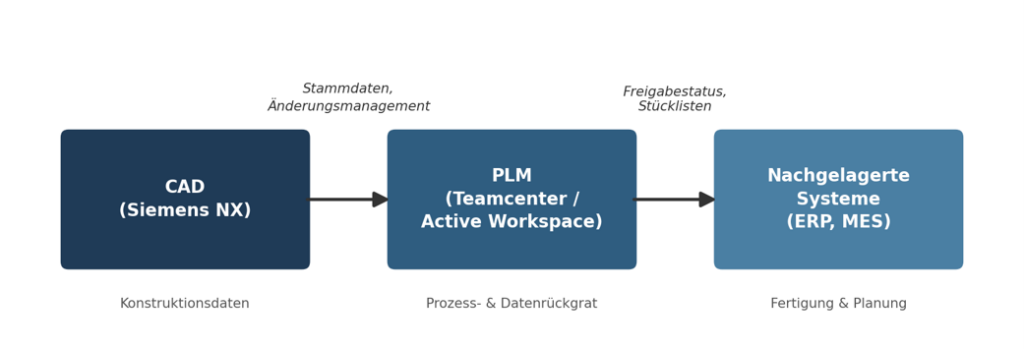
Where Integration Creates Real Added Value
When implemented effectively, CAD/PLM integration not only transforms systems but also measurably changes the day-to-day work of design and project teams.
- Fewer data disconnects: When design engineers can view approval status and change history directly from within NX, there’s no need for manual reconciliations between the CAD repository and the PLM database—one of the most common sources of error in legacy system landscapes.
- Faster approval processes: Structured workflows in Teamcenter Active Workspace shorten coordination cycles because responsibilities and change statuses are traceable for all stakeholders at all times.
- Better traceability: Consistent bill of materials and versioning create transparency regarding product structures—a decisive advantage, especially for complex assemblies and variant management.
- Scalability across locations: Once processes are properly integrated, they can be rolled out to additional plants or teams without creating new siloed solutions each time.
Lessons Learned: Why Integration Projects Typically Fail
From a technical standpoint, CAD/PLM integration is rarely the actual problem. Experience shows that organizational and process-related factors are what determine success or failure.
- Processes Are Not Taken Into Account: If only the technology is migrated without questioning existing design and approval processes, the old complexity is carried over one-to-one into the new system landscape.
- Underestimated Effort for Master Data Quality: CAD structures that have evolved over time contain inconsistencies that must be resolved before integration—otherwise, legacy issues are carried directly into the new PLM system.
- Lack of acceptance in engineering: New workflows in Active Workspace often fail not because of the software itself, but because users do not experience the added value in their day-to-day work—targeted training and support are crucial here..
- Interfaces as an afterthought: If integration with ERP or MES is not considered until late in the project, custom solutions are created that unnecessarily complicate future release upgrades.
Case Study: Teamcenter Active Workspace Implementation at a Commercial Vehicle Manufacturer
As part of a larger PLM project, a company in the commercial vehicle industry migrated from a traditional Teamcenter interface to Active Workspace—with the goal of standardizing design and approval processes across multiple locations.
Instead of a simple software rollout, the implementation was structured as a business-led project: Existing approval and change processes were analyzed and streamlined prior to the technical migration; training materials and e-learning modules were specifically tailored to the new workflows; and a small team of experienced users supported the rollout as the primary points of contact within the business departments.
Result: The number of manual inquiries regarding approval status and bills of materials decreased noticeably, as information was, for the first time, consistently and uniformly visible to all stakeholders. The accompanying training also ensured that the new processes were accepted and actively used from the start—rather than gradually reverting to old habits after implementation.
Conclusion: Integration is a process-oriented issue, not purely an IT one
CAD/PLM integration only realizes its full value when technology, processes, and people are considered together. The key question is not “Which system should we integrate?” but rather, “Which process should this actually improve?”
- Clean master data: A fundamental prerequisite for any robust integration
- Processes Before Technology: Critically evaluate existing workflows before digitizing them
- Support Rather Than a Rollout: Training and technical support are key to ensuring long-term acceptance
For industrial companies, this means: Investments in CAD/PLM integration pay off when they are closely tailored to the company’s own system landscape, existing processes, and the people who work with them every day—with the support of experienced CAD and PLM consultants.